Go back to list of posts
What Is Cloud-Based Contact Management?
Last modified: June 17, 2026


Cloud-based contact management stores and organizes contact data online, enabling real-time access from any device for teams. It offers automation, integration with communication tools, and role-based security to prevent data decay and improve relationship management. Proper setup of automation and permissions ensures the system’s longevity and security, especially for small teams transitioning from manual methods.
Cloud-based contact management is the practice of storing, organizing, and accessing contact data through internet-hosted software rather than local files or physical cards. It gives every member of your team a live, accurate view of every client, prospect, and partner from any device. Unlike a spreadsheet saved on one laptop or a stack of business cards in a drawer, a cloud system updates in real time and travels with you. For business professionals focused on networking and lead organization, this distinction is not minor. It is the difference between managing relationships and losing them.
What is cloud-based contact management and how does it work?
Cloud-based contact management stores and organizes client data in a central web-accessible database that any authorized team member can reach from any device. The system lives on remote servers maintained by the software provider, not on your office hardware. You log in through a browser or mobile app and see the same up-to-date records your colleague just edited from across the country.
The operational flow follows four core steps:
- Data capture. Contacts enter the system through web forms, digital business card scans, email sync, or manual entry. Tools like KADO capture contact details at networking events via QR codes or NFC, feeding data directly into the cloud database.
- Automated logging. Automation handles repetitive tasks like follow-up reminders, interaction timestamps, and status updates without anyone touching a keyboard. This removes the single biggest source of data decay: human forgetfulness.
- Integration with existing tools. Cloud contact systems connect to email clients like Gmail and Outlook, calendar apps, and communication platforms like Slack or Microsoft Teams. Every meeting, email thread, and call can be tied to a contact record automatically.
- Access control and security. Role-based access controls let administrators decide who sees which records. A sales rep sees their own leads. A manager sees the full pipeline. Sensitive client data stays protected without locking down the whole system.
The industry term for this category is contact management software, sometimes called a contact database or contact repository. When it lives in the cloud, the defining feature is real-time, multi-device access with no local installation required.
Pro Tip: Connect your email inbox and calendar to your cloud contact system on day one. Teams that skip this step often abandon the platform within six months because manual logging feels like extra work rather than a time saver.

Cloud-based vs. traditional contact management: what changes?
The gap between cloud and traditional contact management is wider than most professionals expect. Spreadsheets and desktop address books were built for individual use. Cloud systems are built for teams, growth, and speed.
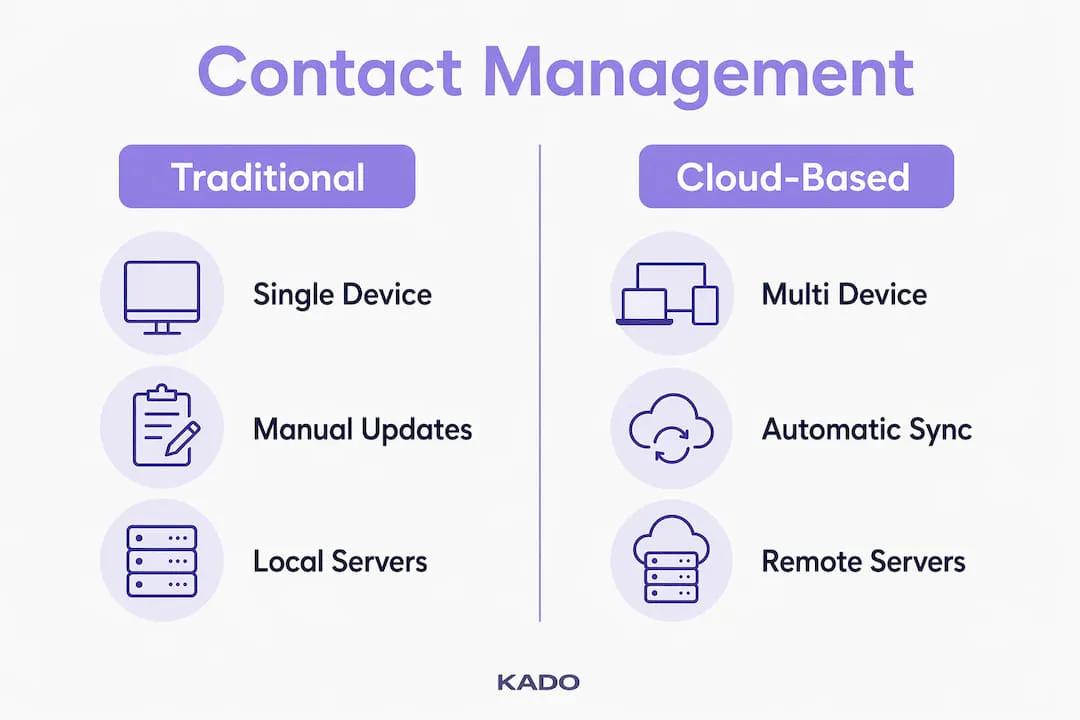
| Feature | Spreadsheet / Desktop | Cloud-Based System |
|---|---|---|
Access | Single device or shared drive | Any device, anywhere, in real time |
Updates | Manual, prone to version conflicts | Automatic, synced across all users |
Cost model | One-time license or free | Subscription, but no IT infrastructure needed |
Maintenance | User manages updates and backups | Provider handles patches and security updates |
Scalability | Limited by file size and user count | Scales with your team instantly |
Security | File-level password protection | Encrypted storage, role-based access, audit logs |
Cloud infrastructure removes the need for on-site physical servers and dedicated IT teams. That reduction in overhead lowers the total cost of ownership significantly compared to on-premise solutions. For a 20-person sales team, the math is straightforward: no server room, no IT contractor, no software update cycles managed in-house.
On-premise systems do offer one advantage worth acknowledging. Organizations with strict data residency requirements, such as certain government contractors or regulated financial firms, sometimes prefer local storage for compliance reasons. For the vast majority of business professionals, though, the cloud model delivers more value at lower cost and complexity.
What are the key benefits of cloud-based contact management?
The cloud contact management benefits that matter most to business professionals fall into five clear categories:
- ✅ Real-time collaboration. Multiple team members update the same record simultaneously. When a sales rep closes a deal in Chicago, the account manager in New York sees it instantly. No email chains, no version conflicts.
- ✅ Time savings through automation. Automation eliminates manual data entry and interaction logging, saving hours of administrative work each week. Follow-up reminders fire automatically. Contact records update when emails arrive.
- ✅ Unified contact view. Aggregating data from email, phone, and social media into one dashboard improves personalization and gives every team member the full relationship history before a call or meeting.
- ✅ Remote and hybrid work support. A field sales rep, a remote recruiter, and an in-office account manager all work from the same live data. The system does not care where you are.
- ✅ Security for sensitive client data. Role-based permissions and encrypted storage protect client information. This matters especially for financial advisors, legal professionals, and recruiters handling confidential details. You can explore how this plays out in practice with contact management for financial advisors.
The security point deserves extra attention. Security features are often overlooked by small businesses until an incident forces the issue. Setting up role-based access at the start of your implementation costs almost nothing. Fixing a data breach after the fact costs significantly more in time, money, and client trust.
Pro Tip: Small teams moving from spreadsheets should designate one person as the data owner during onboarding. That person sets naming conventions, deduplication rules, and integration settings before anyone else starts adding contacts.
How does cloud contact management integrate with CRM and business tools?
Contact management and CRM are related but distinct. Contact management focuses on organizing people data and tracking interactions. CRM extends that foundation to include sales pipelines, deal stages, forecasting, and marketing automation. Many businesses over-invest by purchasing a full CRM when a focused contact management tool is all they need.
Think of contact management as the foundation layer. CRM builds on top of it. Here is how integration typically works in practice:
- Email and calendar sync. Connecting Gmail, Outlook, or Google Calendar means every meeting and message is automatically logged against the right contact. No one has to remember to update the record.
- Sales pipeline connection. When contact data feeds directly into a sales pipeline tool, reps see the full interaction history alongside deal status. This context shortens sales cycles because reps walk into conversations prepared.
- Marketing automation. Linking contact records to platforms like Mailchimp or HubSpot allows segmented outreach based on contact attributes. A recruiter can trigger a follow-up sequence the moment a new contact is captured at a career fair.
- Communication apps. Integrating with Slack or Microsoft Teams surfaces contact details inside the tools your team already uses. A quick search in Slack can pull up a contact’s full profile without switching apps.
Integrating contact management with calendars and email from day one prevents manual logging and dramatically increases user adoption. The systems that get abandoned are almost always the ones that require users to enter data twice. If you want a deeper look at how automation fits into this picture, the guide on contact automation for business leaders covers the mechanics clearly.
For professionals managing investor relationships or high-value client networks, the integration layer is where cloud contact management earns its keep. Every touchpoint captured automatically means no relationship falls through the cracks because someone forgot to log a call.
Key takeaways
Cloud-based contact management is the most practical system for business professionals who need accurate, accessible, and secure contact data without the overhead of traditional tools.
| Point | Details |
|---|---|
Core definition | Cloud contact management stores and syncs contact data online, accessible from any device in real time. |
Cloud vs. traditional | Cloud systems eliminate version conflicts, IT maintenance, and single-device limitations that spreadsheets create. |
Top benefit for teams | Real-time multi-user updates and automation remove the manual work that causes data decay and missed follow-ups. |
CRM distinction | Contact management is the foundational layer; CRM adds pipelines and automation on top. Know which one you actually need. |
Security setup | Configure role-based access controls at implementation, not after an incident. Small businesses are the most common oversight cases. |
Our take: the setup decision matters more than the software
We have seen professionals spend weeks evaluating the best cloud contact management software and then lose six months of value because they skipped the setup fundamentals. The platform choice matters less than most people think. The data architecture choice matters enormously.
The most common mistake we see is treating a cloud contact system like a digital Rolodex. You import your contacts, feel organized for two weeks, and then watch the data go stale because no automation is running and no integrations are connected. A single source of truth fails the moment users stop maintaining it manually. Automation is not a nice-to-have feature. It is the mechanism that keeps the system alive.
The second mistake is skipping role-based access setup. We have worked with small and midsize businesses that gave every employee full admin access because configuration felt like extra work. That decision creates data integrity problems and security exposure that compound over time.
Our honest recommendation: before you evaluate any platform, define what a contact record should contain, who owns data quality, and which tools need to connect on day one. Those three decisions will determine whether your cloud contact system becomes a genuine asset or an expensive address book. The advantages of cloud-based CRM only materialize when the foundation is set up with intention.
— KADO
How KADO helps you put this into practice
If you are ready to move beyond spreadsheets and paper cards, KADO gives you a practical starting point built for professionals who network actively.

KADO combines digital business card sharing via QR codes and NFC with a cloud contact management system designed for real-world networking. You capture contacts at events, sync them to your CRM, and trigger follow-ups automatically. No manual entry, no lost cards, no stale records. The platform includes encrypted storage and role-based access, so your client data stays protected whether you are a solo advisor or part of a 500-person sales team. Explore how KADO’s contact capture and organization tools can replace the manual work that slows your team down. For teams that want mobile-first relationship management, the virtual business card and contact manager is a strong next step.
Frequently Asked Questions
What is cloud-based contact management in simple terms?
Cloud-based contact management is software that stores your contact data on remote servers so you can access, update, and share it from any device. It replaces spreadsheets and local address books with a live, team-accessible system.
How does cloud contact management differ from a full CRM?
Contact management organizes people data and tracks interactions. A full CRM adds sales pipelines, deal forecasting, and marketing automation on top of that foundation. Many small teams only need the contact management layer.
Is cloud contact management secure for sensitive client data?
Yes, when configured correctly. Cloud systems use encrypted storage and role-based access controls to restrict who sees which records. The key is setting up permissions at implementation rather than after a security incident occurs.
What are the main cloud contact management benefits for small teams?
The primary benefits are real-time data access across devices, automation that eliminates manual logging, and lower IT costs compared to on-premise systems. Small teams transitioning from spreadsheets see the fastest gains in data accuracy and follow-up consistency.